Definition of Fantasy
Units 1 to 4 are based around Fantasy so my research will be on the subject Fantasy. However, before we do research on the subject it is a good idea to understand/ know the definition of ‘fantasy’. So that definition for fantasy is “a genre of imaginative fiction involving magic and adventure, especially in a setting other than the real world”.
2D Art Research
What is 2D art?
2D art is a particular type of art which is limited to the dimensions of depth and height. However, 2D art can be made to make objects look 3D using highlights and other techniques. 2D art can be created in many ways including; digital, photographic, painting and drawing art.
Character Design
Templates
Templates are a brilliant way of creating a basic model for a character hat you wish to draw. I find that sometimes trying to decide what character i wish to draw, especially if there has to be a particular theme to it, can be very difficult because of the many different roots and options i could take. However, a template gives me a basic layer for me to work on, so from there on i can build on that layer to create a piece of 2D art, which i can continuously change u till i am happy with my finished design or piece.

Anatomy
Anatomy can help a lot with beginning your drawing of the template. With understanding of anatomy, you are able to draw the outline of a human rather easy as you will know where the muscles are and what sort of proportions they are to each other. In addition, understanding the anatomy of the human body will allow me to know how each part of the body moves so i can draw realistic sketches of people walking or doing some sort of activity. The link below has a few pieces of anatomy that i found on Pinterest, just to give some examples on the human anatomy.
Silhouetting
Silhouetting can be described as a form of art. However, silhouetting is widely used as a method to help give artists a bit of a plan on what they wish to draw. In addition, it allows them to use it as a outline and they can always slightly adjust how they wish to add the details. In digital artwork it makes silhouetting even better as you can create a new layer in which you begin to add details over the top of the silhouette.
 Sketching
Once you have used a technique to create a simple outline, you are then able to begin some sketches with more detail that begin to bring the art piece together to create a more accurate picture of what you wish to draw. Furthermore, it allows the artist to create multiple ideas so they have a range of different sketches to choose from. Even if they do not like any of them, they can always choose from multiple sketches and put different ideas from each sketch and put them together. Lastly, unlike a silhouette, a sketch allows the artist to create a 3D object that actually looks 3D.
Below there are some examples of sketches that i found on Pinterest.
Photobashing
Photobashing is a quick and easy idea creator. It takes a short time but can give artists many different ideas to draw. It allows you to put many different ideas together in loads of ways, so all the best ideas are put together to create every idea possible in a short time. Moreover, even if the artist is not sure at all of what to do photobashing can give them some simple ideas from references that they have been looking at.

Fantasy Characters
This task is based all around the genre of Fantasy, making everything having to be somewhat linked to Fantasy in one way or another. I will be going through different ‘classes’ of characters in the genre of Fantasy. In addition, i wish to show different popular characters from each of the classes to give good examples.
However, Fantasy is a broad genre and can really can be stretched to all corners of your imagination due to the fact the genre is all about fiction and the imaginary. So a character could look like anything and fit into the class. However, in the moldboards i add for each class, ill be using generic or stereotypical versions of classes.
Protagonists
A protagonist is a character in a movie or game that is presented as good character within the media, usually resulting in them being some sort of hero or just a character who does something good within the media.
Protagonists can be in all shapes, sizes and in very different genres of films or games.However, protagonist usually have some similarities that make a protagonist stand out compared to the rest of the characters even if they have not done anything heroic or ‘good’ yet. This could be by the colour of their clothes to even the lighting that is used on a scene that they are in. These small details make all the difference to the difference between a protagonist and any other character.
As you can see from the slider above, the characters all have this subtle lighting that rains down on them showing that they are an important character within the game. Furthermore the characters all have similar shades of colours on their clothes or armor, this is ranging from shades of light blues and greens, except for Batman which has shades of black to show the mystery of the character. Batman is not alone in this and other protagonists have a mysterious presentation about them, a good example of this is Daredevil. The only exception is Mario and Yoshi because they targeted for a younger audience, but they still have the same blues and greens as well as the lighting shining on them. These colours and light techniques make them stand out from other characters, which makes them immediately special and important compared to the rest.
Antagonists
An Antagonist is a character from a movie or game who is presented as some sort of villain or a ‘bad guy’. This tends to be because their goals are despicable or hurt others, this obviously makes them an antagonist.
However, just like the protagonists, antagonists can come in all forms but have a particular colour scheme (which from my research is similar, however with different shades of those colours) that everyone relates them too. In addition, they all have this evil lighting that hovers above them that hints the evil within them or that they will act on later in the game or movie. This allows people to have a good idea who the antagonist is in the game before they have acted out or shown signs from their actions that they are one. All the details that make a evil character are slightly different but are very similar that you can relate them to each other because of their similarity.
As you can see from the slider above these very famous and popular villains from video games are all rather different but at the same time have a fair amount of similarities that we can all see makes them a clear antagonist even if we did not know them already.
The antagonists that i have included in this slider all have very dark shades on their armour or clothing or even around them, these colours are mainly; purples, greens, blues and reds. All these colours have their own evil meaning that helps to show the type of evil the character is.
Green could be poison as Scarecrow uses his ‘Fear Gas’ on the city of Gotham to scare everyone and Joker uses his ‘Laughing Gas’ to send the city of Gotham into havoc, making everyone absolutely crazy beyond repair. Both characters can be easily described as psychotic and insane, with no mental stability to control their behavior because of their childhood or something that effected their brain process and thinking.
Then the colours purple and blue that Thanos, Kerrigan and Arthus have on them can represent the mystery of the characters and their power which is linked to some sort of magic that either makes them evil or allows them to perform evil deeds.
Fantasy Classes
In the fantasy genre characters are split by their characteristics and their methods of combat during war. These different classes give players choice of a character more suited to them because characters have different traits and features.
Sorcerers Class
Sorcerers can be male or female and can be any race. These characters wear robes in lots of colours, depending on the type of characteristics the sorcerer may have. Moreover, it is rare that a sorcerer will wear armour as they would use spells to protect them, if they so wish to.
Sorcerers can either be good or evil, with any goal the desire. They use the power of their soul to create the magic and spells, the stronger they mentally are the stronger their powers are. However, they tend to be physically weak. As though they are just normally people and not a fighter.
Sorcerers powers are different depending on their soul, they could have certain powers created by what they believe in.

All sources are from Pinterest
Knights Class
Knights are soldiers who have a strong idea or belief about something. They will fight to their death to stand by what they believe in. A knight does not need to be medieval, as shown by me adding Batman, Batman fights, risking his life, for what he believes in, which is Gotham. Majority of these knights are head to toe in armour with a large mighty sword. The colours a knight will wear will represent a group or area they are a part of, showing enemies who they are fighting for. However, the armour tends to be darker colours so that they seem more menacing and dangerous. In addition, knights are both male and female, as long as they will fight to the death for what they believe in.

All sources are from Pinterest.
Assassins Class
Assassins are mysterious people/creatures that perform their acts when least expected, making them mostly work in the shadows or darkness. They do this because they are normally fighting a bigger enemy or more enemies. They usually work alone, but will work together if they are fighting for the same purpose. They strike their enemies before the enemy knew they were there and gone before anyone finds out something has happened.
They wear dark light armour and clothes so that they are difficult to see in the dark, making it more difficult to catch them before it is too late. In addition, they cover their face so that the enemy never know who attacked them. Normally they use hoods and face covers to stop the exposure of their identity.
Lastly, the weapons they use are swords and hidden blades, for quick and deadly attack. Making sure they finish their enemies when they use their weapons.

All sources are from Pinterest.
Environments
Environments are a key part of making a great game even greater. It allows characters to experience different types of areas and interact with features and things within the environment. Environments can also bring players together to fight against enemies in dangerous areas or to exchange/trade; goods, rare items, weapons and various other items.
Cities and Towns
Fantasy towns and cities tend to be quite rural as creators can then make them look like they are from a fantasy world, which makes them unrealistic and spectacular. Looking very different from a usual town or city we would see in our world. However, they still hold a basic structure and layout to a real town/city, making them easily recognisable as one. In addition, they still hold the same purpose of getting people together, which is important in a game. This allows for stories to begin or progress, finding new information from people travelling through the area or that stay within it. This can make having a town/city crucial part of a fantasy game so that there is more depth for players to enjoy.
The slider below have some artwork of different type of fantasy like villages and cities. These do include some from popular fantasy RPG games; The Elder Scrolls V Skyrim and Final Fantasy.
Underworld
The underworld is a treacherous place. Filled with demons and evil beasts, that will give any traveller no mercy. Never being tamed by any race. This place is hidden from the outer world and is very difficult for travellers to find.
However, this world has hidden treasures guarded by the most dangerous beasts.
There is not much of a description for the underworld because there is no traveller that gets back out of the underworld. And no beast or person who was born there has gotten out.
These treacherous lands create the dark areas of a RPG game that only the most highly ranked and skilled players would go to so that they can unlock the best weapons and rare items in the game.
Below are examples i found that can represent an underworld. Looking like almost hell itself, a fair amount would say it is covered in lava, as shown by the examples, however this is not always the case. Lastly, anything can really be an underworld its just depending on how the individual perceives it.
Caves
Caves are all unique from each other, each hiding a different mystery. Some can be small, whilst others can be large and deep, separating into more caves and tunnels under the Earths crust.
Caves can be used by characters as a way of hiding treasures or their base from others. However, enemies and beasts can also be in caves, ready for any traveller who is not prepared to be attacked.
Lastly, caves can be dangerous because travellers can get lost and never find a way out, dying at the end of their days. Or there can be dangerous beasts and creatures waiting for them down there.
From the quick research i have done below you can see that caves are full of mystery. Some seem to hide a treasure whilst others seem to hide a enemy and telling these apart could become rather challenging, or they could have both creating more problems for players exploring in caves.
Primary Colours
Primary colours are the three main colours; Red, Blue and Yellow. These colours are what make up the rest of the millions of colours you can find on the spectrum. By mixing two primaries together you make the secondaries and as you do this you create more possible combinations for there to be. however, you cannot use any two colours to create a primary colour, it simple is impossible.
Source from Pinterest

Secondary Colours
These colours are the ‘second’ colours in the spectrum to be created. They are created by the primary colours by their combinations. The secondary colours are; Purple, Orange and Green. Because of these colours, more combinations are available to be created.
Source from: Secondary Colours.
Tertiary Colours
These colours are the colours created by the primary and secondary colours, because of the huge list of colours that can be created from these six colours i shall not list them because i have spent enough time on this as it is. However, tertiary colours also include shades of the primary and secondary colours.
Source from Pinterest.

Animation/Sprite Techniques
Frame By Frame Animation
This the most basic from of animation. It uses the illusion of things moving by taking 24 snapshots per second, with small details changing in each frame to create the illusion of the object moving. This is done by the object being continuously moved in each from and then all the framers put together to create the animation. This can be very tedious whether you use a computer, photos or even hand-drawing each frame to create an animate.
Below i have created a simple animation of a blue bird flying across the screen flapping its arms to stay in the air as it begins to dive down and off the screen. In addition, i used a sprite sheet to create it with each sprite on the sheet being slightly different from the last.

This technique is used for pixel art usually as pixel art has less details to change making it easier to complete with this technique. Below are some examples that i found on Pinterest, click in the link to watch the animations in motion.
Sprite Sheets
Sprite sheets are a bitmap image file that consists of smaller graphic images in a grid like format. They are usually used for pixel art and characters, but they can be used for anything that you wish to animate. All of the graphics in the grid are very similar and are all of the same object, however they all have slight differences. This could consist of the position of their body and limbs to an action they are doing.
The sprite sheet allows users to put the graphics together so they can create a short animation of a character/object doing something.
Lastly, the more subtle the differences between each graphic is and the more of them are on the sprite sheet, the smoother and better animated the animation will be.
Below are some basic and complex sprite sheets, showing how much detail they can go into and shows what kind of level your work needs to be at to create a smooth animation.
Skeletal Animation
Skeletal Animation is a technique which is done on the computer. In this technique a character is represented in two segments: a surface representation used to draw the character (called skin or mesh) and a hierarchical set of interconnected bones (called the rig or skeleton) used to animate (pose or key-frame) the mesh.
This technique is most commonly used for humans or living organisms, to create a realistic and flowing movements and actions for the characters. However, a similar technique can be used to control the deformation of any object a door, a spoon, a building.
The skeleton is the most important part and specifically where the joints are, this is because the joints allow the character to move in its correct manner. If done incorrectly, the character (especially if its a human) will walk in a very unnatural way. Next is rigging, this is where you place the bones exactly where they should be on the character and each defined bone must be connected to its belonging part of the character/object being animated.
An advantage of a Skeletal Animation is that it saves time and is considered easily modifiable. This is because of how each part of the skeleton an rig is done separately, allowing parts of the object/character to be easily swapped. Allowing games to have in-game customisation for their characters, which helps to bring individuality and more interest for the game and its players.
Below are some examples of the Skeletal Animation.
3D Modelling
Fantasy in-game objects
For this i am using previous research to help with this as i have already touched upon fantasy objects and their features and uses in game, so some of my information will come from my summer project.
Bladed Weapons
Bladed weapons in the fantasy world come in all colours and shapes; small, large, long, short etc. They are used in most fantasy games so protagonists can defeat enemies and complete levels to progress through the story.
Blades can be majestic weapons can hold the power for the character or the magic for special attacks.
They can also be trade-able or collectors items for characters, as they can be rare or extra powerful. Making blades a much wanted item in games.
Below is a moodboard of some examples of melee weapons, they can all be found on pinterest however i thought i would represent these as a moodboard instead of a slider.

Potions
Potions are liquids in bottles that can perform magically things to races, creatures, beasts and anything that you may wish for it too. There are millions of potions and they all come in thousands of different colours, different colours tend to show what sort of potion they are, i.e. green for a poison potion.
Mages are the main users of potions as they have the knowledge to know what each one does and they would know how to create them, whereas others would not.
Potions can be very useful for any task the user may wish to complete. this could include healing themselves after battle to regain health so that they are ready to fight again if necessary.
Below are some different fantasy styled potion bottles of different colours of sizes, i used pinterest to search for all of these.

Bows & Crossbows
Bows are a rangers best friend, they are for characters with a true aim or a perfect eye, otherwise the shot will never reach the correct target on purpose. The bow is used for long ranged attacks so that the character hits he enemy before the enemy gets close. Usually one arrow is used at a time, however more than one can be used if necessary.
The crossbow is similar to the bow is a automated version, stopping the character from having to pull pack the arrow. Instead all they have to do is load it onto the crossbow. Because of this it normally is more powerful than a bow, unless a ranger is very good and has a powerful bow. Other characters like warriors or assassins may use crossbows as they are silent killing machines that will badly harm a enemy.
Below i have collected some examples of Pinterest to show the variety of bows and crossbows.

Magic Staff
The magic staff is very similar to a wand, however in addition to the character using it for spells its secondary use is as a melee weapon against enemies when the character has run out of energy or their magic is not working.
Staffs are rather long, being about the height of the character. They come with many different tops to them, making unique and cool designs. They can also be sharp at the top of the staff to add a deadly melee effect if the staff is needed to be used as a melee weapon.
In some fantasy games Staff’s can have certain attributes like the materials they are made out of, which make them either more powerful or better for specific spells. This makes them quite the collectable as you may wish to have a certain Staff for a specific spell.
Below i have collected some examples of Pinterest to show the variety of Staff’s. And from my research you can see that some of the staff’s look specific to a element perhaps, the blue staff being a water staff, the fire staff being for fire and the green staff being for nature.

Tile-able Textures
It is in the name of what they do, they are textures that can be tiled. This can be very useful as they can be laid out perfectly without error, however if they are not made well then they can become rather horrible to look at because you will see the material being repeated across the tiles. A positive is that you do not have to make variations of the same texture over the tiles.
Hand-painted textures
These can be done on drawing software like ‘Photoshop’, they allow creative for the designer. Creating something that is unrecognisable to this world. Below are some hand painted textures that could be used in game.
Substance Materials
The slider below shoes a range of substances materials that can be edited and tiled for a specific area within the game. These are usually created in software’s like ‘Substance Designer’.
Blockout
Blockout is a 3D model planner. You use basic shapes; cubes, rectangles, cylinders, pyramids etc, to create a simple object or structure. This will have no details because it is just a plan. However, this is helpful as this shape will still be seen in the final piece so making sure you get this correct is important to create a good final piece.
Below i have created a very, very, very basic ass sword that could be used a plan/ beginning point to create a masterpiece however one minute of time was long enough on this. 🙂

3D Modelling tutorials/techniques
The internet is the best source for tutorials on 3D Modelling, with millions of videos and blogs covering everything you could imagine and any task that anyone could find difficult.
Below i will be showing some video tutorials that will be helpful for specific techniques on certain areas and topics under 3D Modelling.
This Youtuber, 3dEX, is showing a speed tutorial on how you would model a simple dagger in Maya. This useful to me as one i have not done this before and secondly because i am also using Maya as a software to practise 3D Modelling. In addition, he shows the texturing process to give the dagger the finalised look the dagger needs.
Again i have used the same Youtuber for a tutorial on substance designer, 3dEX. He presents the YouTube video in the same way as the last, showing a speed run of the full process (start to finish), allowing me to quickly see how i should be using the software. And lastly same again, this is useful to me because i will also be using ‘Substance Design’ in the future.
For my last tutorial i wanted some help with Hand-Painted textures, it did not take long to find someone on YouTube who gave a full tutorial, with voice-over, that helped me fully understanding how he was doing it and the techniques he was using to create the design. In the video ‘Mikibencz’ had already modelled the dagger so that he could show me just the texturing.
From the videos i have found you can see that some people are dedicated to modelling and texturing and they will produce enough content so that you do not have to search anywhere else for tutorials on anything you wish to find out about. But if they do not have the information that you need there is always someone else who has created a video or a blog post about the topic you wish to learn about.
Programming
Flowcharts
Flowcharts are visual and symbol representations of processes. Each process has actions that players can take which can lead to consequences and changes in the sequence of the process, an example of this is if the player hits the ball or not (if yes the ball rolls and if not it does not).
Source from: Pinterest.

UML Diagrams
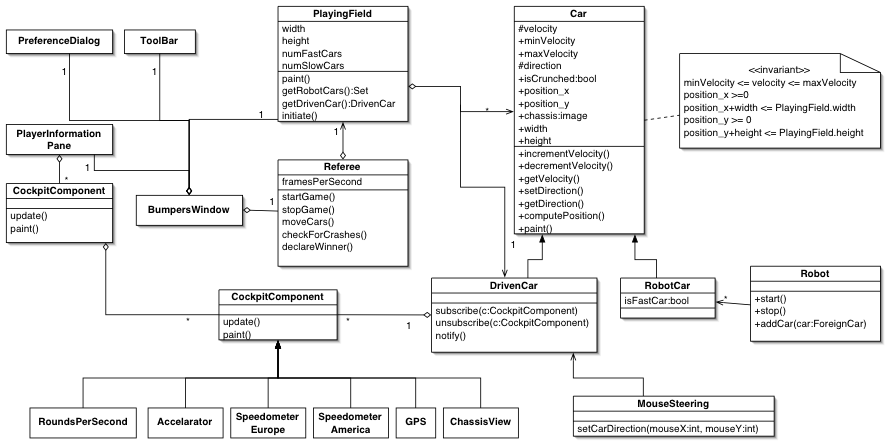
UML stands for ‘Unified Modelling Language’. UML is a standardised modelling language enabling developers to specify, visualise, construct and document artifacts of a software system. In addition, UML diagrams describe the boundary, structure, and the behavior of the system and the objects within it.
However, UML is not a programming language but works as a plan to help when using a computer language.
Below is a example for a car game, the character choosing car, what happens when the car reaches speeds etc.
Pseudocode
Pseudocode (pronounced SOO-doh-kohd) is a fully descriptive yet simplified version of an algorithm or computer program, yet Pseudocode is a natural language rather than a computer language. Because of this it allows designers or leading programmers to give programmers a very detailed and easy to read template of what they need to do. Moreover, it would make sure what the programmers wish to achieve is truly possible and reasonable in the budgets.
Below is a very basic example of Pseudocode that i created at the beginning of the year.
function update_movement(delta_time)
if (w_key_is_pressed)
speed_y = SPEED
if (speed_x == 0)
facing = up
else if (s_key_is_pressed)
speed_y = SPEED
if (speed_x == 0)
facing = down
if (d_key_is_pressed)
Class and Objects
What is Class?
A ‘Class’ in a object-oriented programming is almost like a mini separate mini-program with its own information and context methods. Some of the methods can be accessed publicly and some can be made private.
What is Objects?
An object is basically a block of memory that has been allocated and configured according to the blueprint. A program may create many objects of the same class. And in an object-oriented language such as C#, a typical program consists of multiple objects interacting dynamically.
Simple Physics
Physics are forces tat can effect the environment and things in it in specific ways. For example, gravity creates a pulling force downwards, towards the core of the earth. This will make objects fall down if there is not anything to hold them up.
What are Variables and why do we use them?
Variables are used to store information to be referenced and manipulated in a computer program. They also provide a way of labelling data with a descriptive name, so our programs can be understood more clearly by the reader and ourselves. It is helpful to think of variables as containers that hold information. Their sole purpose is to label and store data in memory. This data can then be used throughout your program.
Collectibles
Collectibles are very important in games and what give meaning and power within a game. They can change a players overall performance and/or help them to complete/defeat a level. These could be coins or stars that players need to collect throughout the level so that they can gain extra points so that they can do better than other players. Or they could be power-ups to help the player become stronger, giving them more skills in the game. Collectible may also be rare items that players can find as a sort of side quest so that they slow down their game play and explore the map/area.
Importing sprites
In Unity there are two ways of importing sprites or models onto your scene. Both ways are very easy, it just depends on which you would rather do, basically personal preference.
The first way is to drag the file from your file explorer and onto the project panel. This then will load in and be a part of this scene now, making it available for you to use it as you wish. This is slightly more simple than the next one, however it means you will need to keep the file explorer open and have to keep dragging all the files you need onto the project panel.
The second way to import sprites is to right click on the project panel and then clicking on ‘import new asset’ then finding the file. This will then do the same ass the previous method, allowing you to be able to do as you with to the sprite. The only difference is that you are able to do multiple files at once.
Instantiation
Instantiation is the process where a object is created into existence from an action done by the player. An example of this is when Mario jumps and hits the question mark ? box, which then releases coins or releases some sort of power-up, like a mushroom.. This can only be done because of instantiation.

this source was used from Mario GIF
 LvL 3 Games Dev